
Resources and Recipes: Current Production Reference
Use this as a production relationship index, not a claim that every resource or recipe in Early Access is listed.
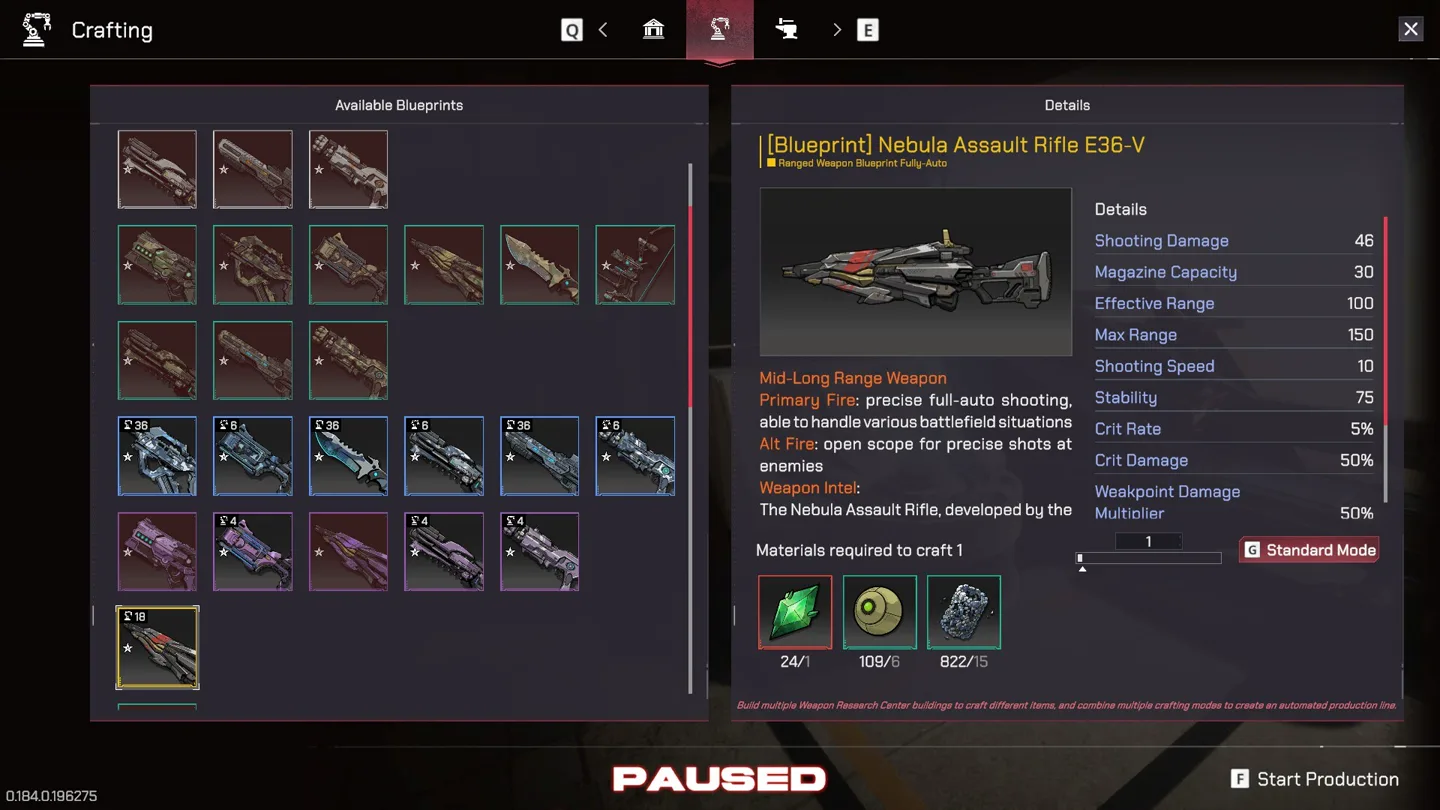
Table of contents
This page is a bounded production reference for the current main-app Early Access edition. It includes names and relationships that are readable in the current material. It is not a complete resource list, a complete recipe book, or a substitute for the costs displayed in your build.
How to trace any production item
For an item you cannot produce, fill this chain from right to left:
wanted item ← crafting building ← required materials ← processors ← raw sources
Then add the operational layer:
worker + production request + input delivery + output space
If the item name is known but one material icon is unreadable, do not invent a name. Find the icon in storage, a processor output, or another current recipe and connect it only after the label is legible.
Current named work sites
The current assignment screen visibly includes this sample:
| Group | Readable current names | Practical use |
|---|---|---|
| Extraction and field | Deep Drill Tower, Titanite Mine, Tendril Tree, Bitter Herb | Start the raw-material side of a chain |
| Food and life | Greenhouse, Animal Farm, Kitchen | Plant, breed, and process food-related output |
| Conversion | Wood Harvest Plant, Ore Refinery | Turn raw inputs into later-stage material |
| Research and equipment | Weapon Research Center, Armor Workshop, Vehicle Works | Unlock or produce specialist capability |
| Civic and command | Command Center, Victory Square | Colony command and government functions |
| Strategic production | Space Shipyard | Higher-order construction and progression |
One transport entry is clipped in the current screenshot, so this table does not publish a guessed full name for it. Resource Transport Station is a named transport building in the current change set and should be considered when a remote line has stock but no movement.
Current readable crafting card
Nebula Assault Rifle E36-V
The current crafting screen identifies [Blueprint] Nebula Assault Rifle E36-V as a ranged weapon with fully automatic behavior.
| Field | Current readable value |
|---|---|
| Primary fire | Precise full-auto fire |
| Alternate fire | Open scope |
| Shooting damage | 46 |
| Magazine | 30 |
| Effective range | 100 |
| Maximum range | 150 |
| Shooting speed | 10 |
| Stability | 75 |
| Critical chance | 5% |
| Critical damage | 50% |
| Weak-point multiplier | 50% |
Three material icons and their counts are visible on the recipe, but the material names are not legible enough in the current image to publish. The counts alone are not useful if the items cannot be identified, so the recipe row stops at the honest boundary.
Diagnose a missing recipe input
- Select the recipe and note the exact unknown icon and count.
- Scan current storage for the same icon and read its label there.
- If absent, inspect processor outputs and research unlocks.
- Trace the named processor backward to extraction.
- Confirm a worker, request mode, carrier, and output destination.
- Return to the recipe only after material flow is visible.
This approach works even when the database does not yet name the material.
Production mode reminder
After the relevant warehouse capability, late pre-unlock documentation describes Order, Stock, and Auto modes. Use them for a fixed quantity, reserve target, or mature continuous line respectively. Read Jobs and Production before changing the mode if the real problem could be input, hauling, staffing, or full output storage.
Database boundary
Included here:
- a readable sample of named work sites;
- one current weapon card with readable behavior and combat values;
- a repeatable method for identifying an unknown recipe input;
- the connection between production modes, storage, and transport.
Not included yet:
- every resource and processor;
- material names that cannot be read safely;
- a full recipe list;
- throughput ratios or “perfect” production blocks;
- claims that pre-unlock numbers are unchanged unless the current screen shows them.
Use Buildings and Layout when the chain is known but the route is inefficient, and Weapons and Firing Modes when you need to interpret the completed weapon.
Related guides
Jobs and Production: Diagnose the Bottleneck
Match visible work attributes to jobs and trace stalled production from input to worker to output.
Read guideBuildings and Layout: Functional Colony Zoning
Place work, storage, housing, and transport by flow and access instead of copying an “optimal” grid.
Read guideWeapons and Firing Modes: Read the Current Stats
Interpret primary and alternate fire, range, stability, magazine, critical, and weak-point values.
Read guide